# Deploying Sourcegraph executors using Docker Compose
This feature is in beta and might change in the future.
A [docker-compose file](https://github.com/sourcegraph/deploy-sourcegraph-docker/blob/main/docker-compose/executors/executor.docker-compose.yaml) is provided to deploy executors standalone, or alongside your existing Sourcegraph deployment.
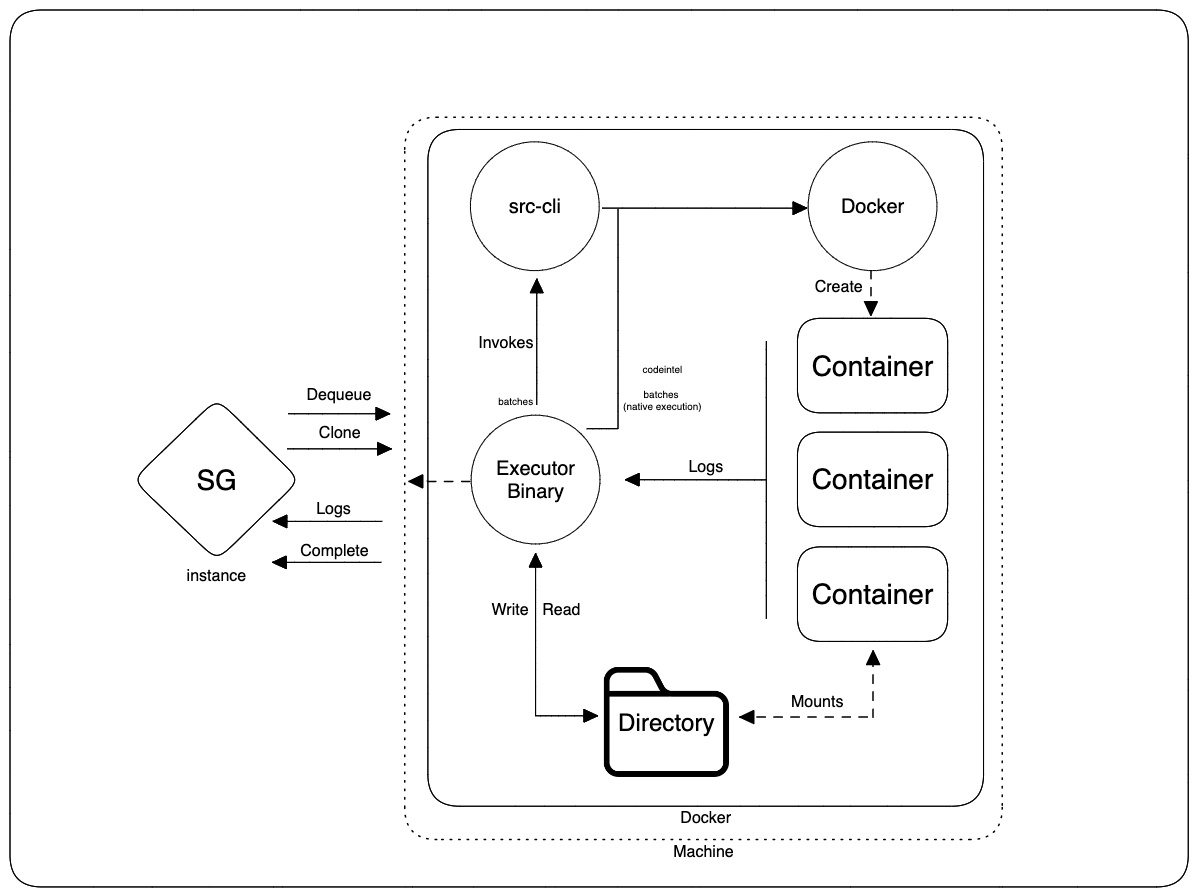
## How it works
The executor service itself runs in a Docker container and polls Sourcegraph for work. After dequeuing a job, it clones the target repository into a workspace and uses the Docker daemon to run each job step sequentially in another container. Batch Changes jobs that do not use native execution invoke `src`; code navigation and native Batch Changes jobs invoke Docker directly. Logs and the final job status are streamed back to Sourcegraph.
**On this page**
- [Requirements](#requirements)
- [Deployment](#deployment)
- [Upgrading executors](#upgrading-executors)
- [Related configuration](#related-configuration)
- [Security note](#note)
## Requirements
Privileged containers are required to run executors in docker-compose. This is because executors require access to the docker daemon running on the host.
## Deployment
### Prerequisites
- Install [Docker Compose](https://docs.docker.com/compose/) on the server
- Minimum Docker [v20.10.0](https://docs.docker.com/engine/release-notes/#20100) and Docker Compose [v1.29.0](https://docs.docker.com/compose/release-notes/#1290)
- Docker Swarm mode is **not** supported
- Clone the [deploy-sourcegraph-docker](https://github.com/sourcegraph/deploy-sourcegraph-docker) repository and check out the tag for your Sourcegraph version, such as `v7.5.0`
### Configure the executor with an override file
Put your executor configuration in an override file instead of editing `executor.docker-compose.yaml`. The release tag you check out sets the executor image version, so an override file that leaves out `image` keeps your settings through upgrades without merge conflicts. See [What is an override file?](/self-hosted/deploy/docker-compose/configuration#what-is-an-override-file).
Set the [environment variables](/self-hosted/executors/executors-config) the executor needs in the override file. Your override file only needs the values you change; Docker Compose merges them into the `executor` service from the base file.
#### On the same machine as Sourcegraph
Add an `executor` service to the `docker-compose.override.yaml` file in the `docker-compose` directory, next to your other overrides:
```yaml
# docker-compose/docker-compose.override.yaml
services:
# ...your other Sourcegraph overrides
executor:
environment:
# Must match `executors.accessToken` in site configuration
- EXECUTOR_FRONTEND_PASSWORD=
- EXECUTOR_QUEUE_NAMES=batches,codeintel
```
The base file sets `EXECUTOR_FRONTEND_URL` to the frontend container, `http://sourcegraph-frontend-0:3080`, which works on the same machine.
Start Sourcegraph and the executor with the base file, the executor file, and your override file, in that order, from the `docker-compose` directory:
```bash
docker compose \
-f docker-compose.yaml \
-f executors/executor.docker-compose.yaml \
-f docker-compose.override.yaml \
up -d --remove-orphans
```
Once your override file configures the `executor` service, pass all three
files to every `docker compose` command. Without
`executors/executor.docker-compose.yaml`, Docker Compose fails with
`service "executor" has neither an image nor a build context specified`.
#### On a standalone machine
Create an override file in the `docker-compose/executors` directory. It also defines the `sourcegraph` network that the executor service joins:
```yaml
# docker-compose/executors/executor.docker-compose.override.yaml
services:
executor:
environment:
- EXECUTOR_FRONTEND_URL=https://sourcegraph.example.com
# Must match `executors.accessToken` in site configuration
- EXECUTOR_FRONTEND_PASSWORD=
- EXECUTOR_QUEUE_NAMES=batches,codeintel
networks:
sourcegraph:
```
Start the executor from the `docker-compose/executors` directory:
```bash
docker compose \
-f executor.docker-compose.yaml \
-f executor.docker-compose.override.yaml \
up -d
```
## Upgrading executors
Check the [changelog](https://sourcegraph.com/changelog/self-hosted/docker-compose) for any executor-related breaking changes or new features.
1. Check out the tag for the target version in your `deploy-sourcegraph-docker` clone:
```bash
cd deploy-sourcegraph-docker
git fetch
git checkout v
```
The executor image comes from `executor.docker-compose.yaml` at that tag. If your override file sets `image` for the `executor` service, remove it so that the tag's image is used.
2. Recreate the executor container by running the same `docker compose up -d` command you deployed with, including your override file. Docker Compose pulls the new image and recreates the executor container. The executor briefly disconnects during the restart.
3. Verify the new container is running with the expected image:
```bash
docker ps --filter name=executor --format 'table {{.Names}}\t{{.Image}}\t{{.Status}}'
```
4. Confirm the executor is online and reporting the expected version under **Administration > Executors > Instances**.
## Related configuration
- [Add custom certificates to a Docker Compose deployment](/self-hosted/executors/custom-certificates#add-certificates-to-a-docker-compose-deployment)
- [Use private container registries](/self-hosted/executors/private-registries)
## Note
Executors deployed via Docker Compose do not use [Firecracker](/self-hosted/executors/firecracker), meaning they require [privileged access](https://docs.docker.com/engine/reference/run/#runtime-privilege-and-linux-capabilities) to the Docker daemon running on the host.
If you have security concerns, consider deploying via [terraform](/self-hosted/executors/deploy-executors-terraform) or [installing the binary](/self-hosted/executors/deploy-executors-binary) directly.